Festival
How to create Diwali Photo Prompt For Boys
A practical starting guide for Diwali Photo Prompt For Boys. Prepare your input, use the original prompt, and adapt the result.
Create Diwali Photo Prompt For Boys
This guide starts with the Diwali Photo Prompt For Boys prompt from our Festival collection. Use the original instructions for your first attempt, then change one detail at a time.
Prepare your input
Upload a clear, well-lit reference photo before pasting the prompt. Keep the face or main subject unobstructed.
The original prompt
Diwali Photo Prompt For Boys
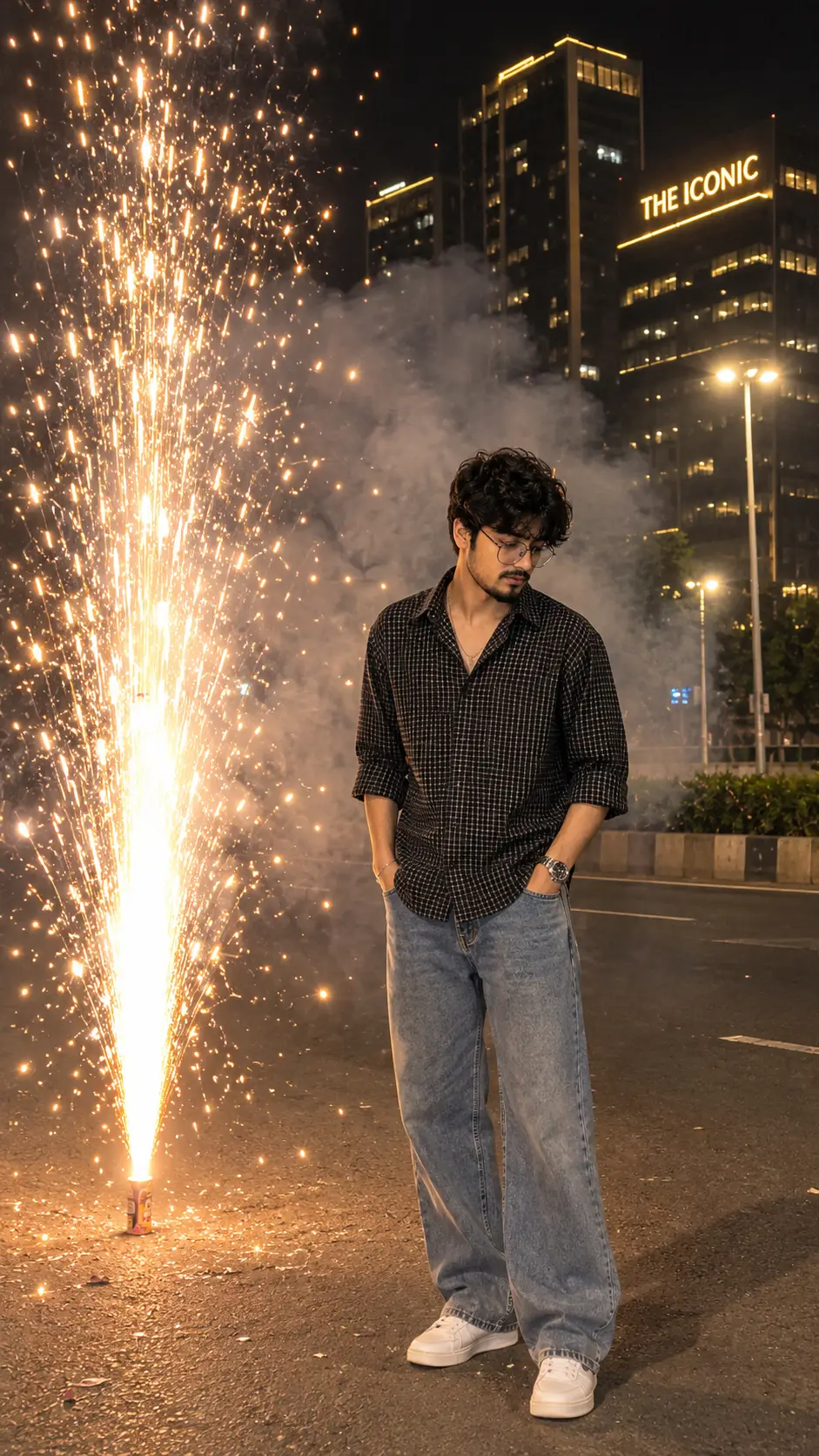
{ "image_type": "Ultra Realistic Night Photography", "aspect_ratio": "9:16", "resolution": "4K Ultra HD", "reference_image": { "usage": "Use the uploaded reference photo as the primary visual and identity reference.", "gender_adaptation": "Determine the person's gender from the reference photo. If the person is male, preserve and adapt all subject details as masculine. If the person is female, preserve and adapt all subject details as feminine and naturally appropriate to the woman shown in the reference photo.", "identity_lock": "Preserve the exact identity and natural appearance of the person in the reference photo, including facial structure, face shape, skin tone, hairstyle, hairline, eyes, eyebrows, nose, lips, jawline, facial hair if present, and body proportions. Do not change, beautify, reshape, age, de-age, slim, widen, or otherwise alter the person's authentic appearance." }, "subject": { "gender": "Automatically match the gender and natural appearance of the person shown in the reference photo.", "pose": "Standing naturally on a road beside a large fountain firework, body slightly turned toward the firework, head tilted down, looking at the sparks", "expression": "Natural, calm and candid expression", "appearance": "Preserve the person's natural hairstyle, hair characteristics, facial features and overall appearance from the reference photo.", "outfit": { "male": "Black and white small-checkered oversized button-up shirt, sleeves rolled up to elbows, top buttons open, loose-fit light blue washed baggy denim jeans, white sneakers", "female": "Adapt the same outfit concept naturally and appropriately for the female person shown in the reference photo, while maintaining the black-and-white small-checkered oversized button-up shirt, rolled sleeves, light blue washed baggy denim jeans and white sneakers." }, "accessories": [ "Silver wristwatch on left wrist", "Simple bracelet on right wrist", "Thin chain necklace" ] }, "firework": { "type": "Large ground fountain firework", "position": "On the road to the left side of the person", "effect": "Bright golden and white sparks shooting vertically and spreading outward in multiple directions", "smoke": "Thick white and grey smoke rising behind the person and filling the middle background", "lighting": "Firework sparks illuminating the person's clothing, face, hands and surrounding road with warm golden light" }, "background": { "location": "Modern urban city street at night", "buildings": "Tall glass skyscrapers with illuminated golden windows", "signboard": "A glowing golden building sign reading THE ICONIC", "streetlights": "Tall street lamps glowing brightly in the background", "environment": "Dark night sky, empty asphalt road, distant city lights and realistic fireworks smoke" }, "camera": { "shot_type": "Full body vertical portrait", "angle": "Eye-level slightly wide-angle smartphone photography", "composition": "Person positioned on the right side, fountain firework on the left side", "lens": "35mm", "focus": "Sharp focus on the person and firework", "depth_of_field": "Natural realistic background depth" }, "lighting": { "style": "Cinematic night photography", "main_light": "Bright golden firework illumination", "secondary_light": "White streetlights and warm building lights", "contrast": "Natural high contrast", "atmosphere": "Dramatic, festive and realistic" }, "quality": { "style": "Photorealistic DSLR photography", "details": "Realistic skin texture, natural fabric details, accurate hands, realistic smoke and individual firework sparks", "color_grading": "Dark cinematic night tones with warm golden highlights", "sharpness": "Ultra detailed", "noise": "Natural low-light camera grain" }, "negative_prompt": [ "Cartoon", "Anime", "Artificial CGI look", "Face distortion", "Different identity", "Gender mismatch", "Extra fingers", "Deformed hands", "Extra limbs", "Wrong outfit", "Blurred subject", "Overexposed fireworks", "Fake smoke", "Daylight", "Watermark", "Instagram interface", "Phone status bar", "Comment section", "Unwanted text" ] }
Instructions to pay attention to
These details come directly from this prompt:
- smoke": "Thick white and grey smoke rising behind the person and filling the middle background",
- lighting": "Firework sparks illuminating the person's clothing, face, hands and surrounding road with warm golden light
- background": {
Make your first version
- Copy the complete prompt above.
- Paste it into your chosen AI tool.
- Generate a first result before adding extra instructions.
- Compare the subject, framing, and lighting with the preview.
Adapt the idea
- Change the background while keeping the subject and visual style.
- Try soft natural light instead of dramatic lighting.
- Ask for extra space around the subject if you need a different crop.
Refine the result
If instructions conflict, keep the details most important to your idea and remove the rest. Results depend on the model, reference image, and settings; the preview is a reference rather than a guaranteed output.