 Spiritual6,008 copies
 195 copies
Spiritual · Free image prompt
Barasana Radha Rani Temple Gemini Prompt
Make this look your own. Copy the full prompt and follow the guide below.
The prompt
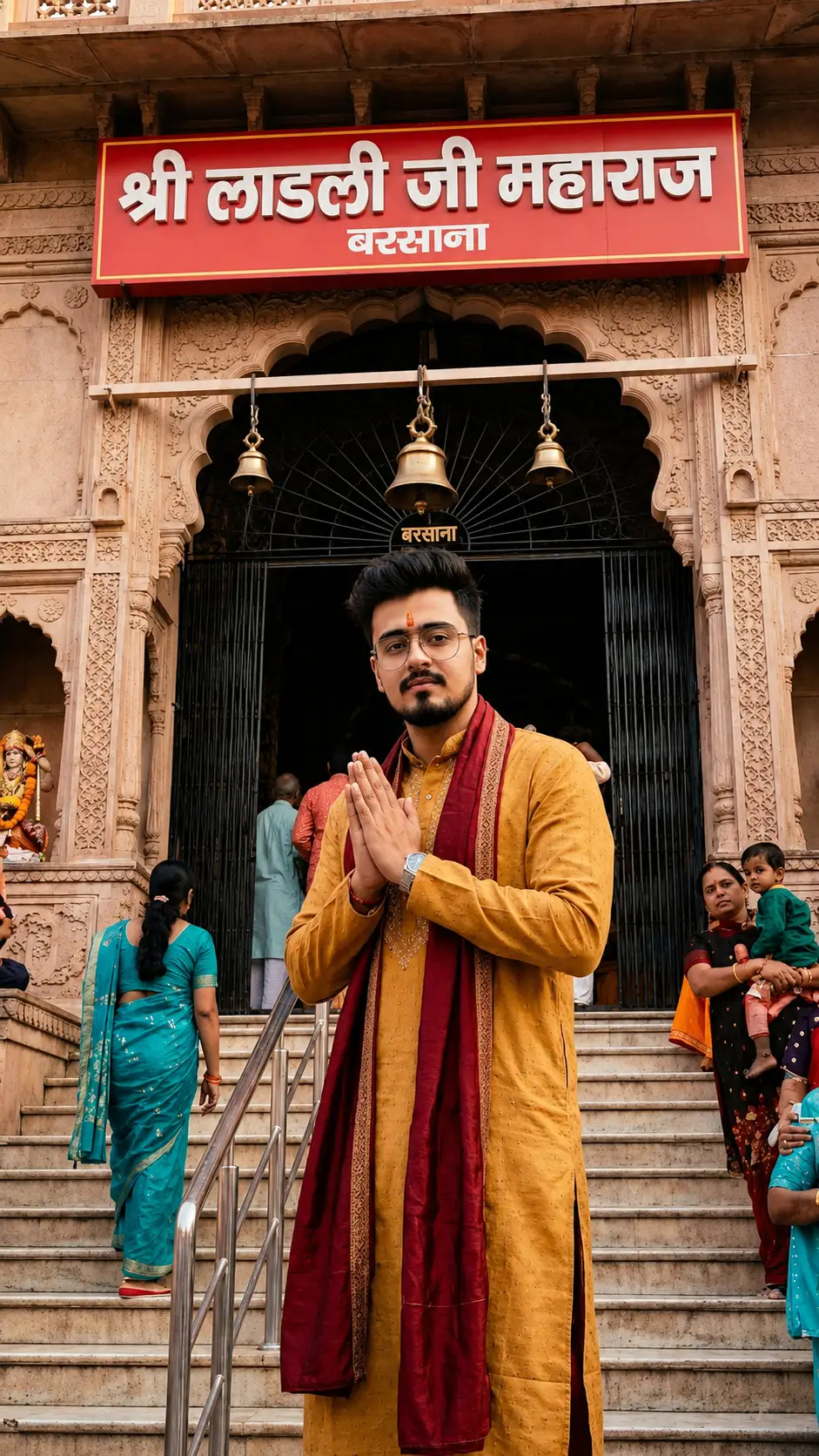
Read the guideUltra-realistic cinematic devotional travel photograph at the EXACT ORIGINAL REAL-LIFE entrance of Shri Radha Rani Temple (Shri Ladli Ji Maharaj Mandir), Barsana, Uttar Pradesh.
MOST IMPORTANT — ABSOLUTE LOCATION ACCURACY (VERY STRICT):
The temple entrance MUST be the EXACT REAL ORIGINAL Barsana Radha Rani Temple entrance exactly as seen in authentic real travel photographs. Do NOT generate fantasy temple architecture, AI-designed gates, redesigned carvings, modernized structures, extra domes, fake stairs, imaginary pillars, or altered layouts.
The image must look like an actual DSLR photograph captured at the REAL ORIGINAL temple location.
STRICTLY PRESERVE ALL ORIGINAL REAL DETAILS: • exact sandstone architecture
• exact staircase structure
• exact railings and side walls
• exact entrance gate proportions
• exact carvings and pillars
• exact bell placement
• exact flags
• exact temple textures
• exact doorway shape
• exact dark gate interior
• exact overall composition of the real temple
DO NOT CHANGE OR RECREATE ANYTHING.
IMPORTANT REAL SIGNBOARD TEXT (VERY STRICT):
Use the ORIGINAL REAL red signboard exactly like authentic Barsana temple photographs with the EXACT Hindi text:
“श्री लाडली जी महाराज”
and below it:
“बरसाना”
Text must appear naturally painted/printed on the original red board exactly like the real temple. Do NOT translate, stylize, redesign, misspell, or reposition the text.
IMPORTANT GATE INTERIOR:
Keep the inside of the temple gate naturally DARK and shadowed exactly like real photos of the original entrance. Do NOT show bright interiors, glowing lights, deity visibility, artificial lighting, or visible inside details.
CAMERA ANGLE & COMPOSITION (VERY STRICT):
Photo must be captured from FAR BELOW exactly like a real person standing at the bottom of the staircase using a premium DSLR camera.
Show: • FULL staircase
• COMPLETE temple entrance
• FULL red signboard
• full railings and pillars
• natural wide composition
Do NOT crop the temple.
Do NOT zoom into the person.
Do NOT use close framing.
Temple architecture must dominate the frame.
IMPORTANT SUBJECT IDENTITY PRESERVATION:
Preserve the exact real identity from the uploaded image — same hairstyle, facial structure, beard style, glasses, skin tone, body shape, realistic proportions, and natural appearance. The person must look fully realistic and naturally photographed, not AI-generated.
SUBJECT POSITIONING & BODY ANGLE (VERY IMPORTANT):
Add me naturally standing somewhere on the staircase in a devotional namaskar pose.
Pose must match realistic candid travel photography style: • body turned around 70% toward camera side
• top-left/back side slightly visible
• NOT fully front-facing
• NOT fully back-facing
• NOT facing the temple completely from behind
• face partially visible naturally from side angle
• realistic over-shoulder style body positioning
• natural candid devotional expression with eyes softly closed
• body smaller compared to the huge temple architecture
The pose should feel exactly like a real DSLR candid travel photo where the person is slightly angled toward the camera while still maintaining devotional atmosphere.
CLOTHING (VERY IMPORTANT):
Wear a premium mustard-yellow / saffron-yellow traditional kurta with subtle elegant embroidery and rich realistic fabric texture.
Add a luxurious deep maroon / wine-red silk stole (safa-style upper cloth) draped naturally over both shoulders exactly inspired by the reference image outfit. The stole should contain subtle traditional golden woven patterns and premium devotional fabric detailing.
Outfit must feel: • elegant
• devotional
• cinematic
• realistic
• premium Instagram aesthetic
• natural cloth folds and movement
CROWD CONTROL:
Keep only a few realistic devotees naturally scattered on the staircase. Avoid heavy crowd.
LIGHTING & STYLE:
Warm natural daylight, authentic sandstone tones, realistic shadows, ultra-detailed textures, cinematic DSLR photography, realistic proportions, spiritual atmosphere, premium Instagram aesthetic, highly realistic devotional travel photography.
FINAL OUTPUT MUST LOOK:
Like a REAL DSLR travel photograph captured at the ORIGINAL REAL Barsana Radha Rani Temple entrance — NOT an AI-generated recreated temple.
No sign-up needed. You can also select and copy the text manually.
More inspiration for you
View all →

SponsoredAd
The creator's guide
How to use Barasana Radha Rani Temple Gemini Prompt
Use “Barasana Radha Rani Temple Gemini Prompt” as a starting point for your Spiritual creation. The guide below highlights instructions from this specific prompt and shows what to change when adapting it to your own idea.
01
Get ready
Start with a clear reference photo. Upload it to an AI tool that accepts images before pasting the prompt. Choose a well-lit image with the subject unobstructed.
02
Copy & create
Copy the complete prompt above, paste it into your AI tool, and generate a first version. Keep the original instructions for your first attempt.
03
Refine one detail
Check the eyes, hands, skin texture, and likeness first. If the face changes too much, ask to preserve the reference identity and remove conflicting appearance instructions.
Inside this prompt
Lighting
Do NOT show bright interiors, glowing lights, deity visibility, artificial lighting, or visible inside details
Composition
• exact overall composition of the real temple
Style
Ultra-realistic cinematic devotional travel photograph at the EXACT ORIGINAL REAL-LIFE entrance of Shri Radha Rani Temple (Shri Ladli Ji Maharaj Mandir), Barsana, Uttar Pradesh
Three variations to try
Try one follow-up at a time after generating your first result.
Change the mood
Keep the subject and composition. Replace the lighting with soft natural window light and a calm, muted palette.
Make it your own
Keep the visual style. Replace the setting with a location of your choice and remove any details that conflict with the new scene.
Adapt the framing
Keep the face and identity consistent. Leave extra space around the head and shoulders for a square profile-picture crop.
If your result looks different
The preview is a visual reference, not a guaranteed output. Results vary by model, settings, and reference image. Keep the instructions that matter most, remove contradictions, and change one detail between attempts.